
The 30-second answer
- What it does:
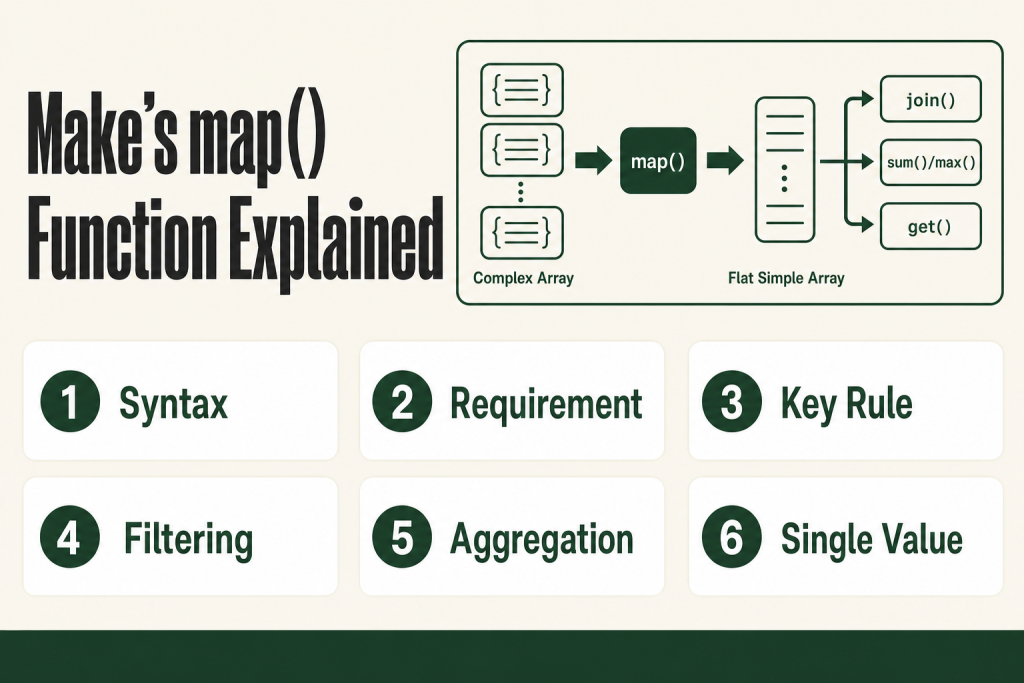
map()walks every collection in a complex array, extracts one named field, and returns a new flat array of those values. - Full syntax:
{{map(complex array; key; [filter key]; [allowed values])}} - The key is a raw field name, not the display label. Type it manually; don’t pick it from the mapping panel.
- map() only works on complex arrays (arrays of collections). It silently returns empty if you point it at a simple array or the wrong level of nesting.
- The optional third and fourth arguments let you filter: return the field only where another field equals a specific value.
- Combine with get() to pull a single item out of the resulting array by index, or with
join()to turn the array into a comma-separated string. - Wrap with math functions like
sum(),average(),max(), ormin()to aggregate numeric fields in one expression. - Empty result, not an error, usually means wrong field name, wrong array level, or a filter that matches nothing.
Take this fix into your next scenario. The free Builder’s Companion Kit collects the checklists and templates that pair with this guide — so next time, you start from a template, not a blank page. Grab it free →
- Simple Arrays vs. Complex Arrays: Why the Distinction Matters
- make map function Syntax, Parameters, and What Each Argument Does
- Basic Examples: Extracting One Field From Every Item
- Combining map() With Math Functions
- The get(map()) Pattern: Pulling One Specific Item by Position
- Worked Example: Summarizing an Order’s Line Items in One Field
- Nested Collections, Dot Notation, and When map() Hits Its Limit
- Common Errors and Why map() Returns Empty
- When map() Is Not the Right Tool
- FAQ
The make map function is the fastest way to pull one field out of every item in a complex array without spinning up an Iterator, burning extra operations, or writing a workaround you’ll regret in three months. If you’ve ever stared at an array of order lines, attachments, or API response items and needed just the IDs, emails, or amounts, map() is the expression you want. This article covers the full syntax, concrete worked examples, every common failure mode, and how to combine map() with get(), join(), and math functions so the whole thing actually lands.
Simple Arrays vs. Complex Arrays: Why the Distinction Matters
Make draws a hard line between two array types, and map() only works on one of them.
A simple array contains standalone values: a list of strings, numbers, or email addresses. There are no named fields inside each item, just the value itself.
A complex array contains collections, where each collection holds several named fields. Think of a row in a spreadsheet: each row is a collection with a name field, an email field, an amount field, and so on. The array is the whole table; each collection is one row.
The email attachments that Make’s Watch Emails module returns are a textbook example: the module gives you one array, and every item inside it is a collection with fields like name, content, and size.
map() needs a complex array as its first argument. Point it at a simple array and it returns empty, with no error message to tell you why. Point it at the right array but at the wrong nesting level, same result. That one misunderstanding causes most of the “map() isn’t working” questions you’ll find in the Make community.
Before you write the expression, open the execution detail for any upstream module and confirm you’re looking at an array of collections, not an array of plain values. The output panel will show the purple array token with a collection icon inside each item if the data structure is correct.
make map function Syntax, Parameters, and What Each Argument Does
The full syntax is:
{{map(complex array; key; [filter key]; [allowed values])}}Here is what each argument controls.
- complex array (required): The source array, referenced by module number and field path, for example
3.lineItemsor7.data. This must be the array token itself, not a single item inside it. - key (required): The raw field name of the field you want to extract from every collection. Type this manually using the field’s raw name, not the display label Make shows in the mapping panel. The two are often different, and using the display label is one of the most common causes of empty results.
- filter key (optional): The raw field name of a second field you want to check. When you supply this,
map()only returns thekeyvalue from collections wherefilter keymatchesallowed values. - allowed values (optional, required if you supply filter key): One or more values separated by commas. The function returns the
keyfield only from collections where thefilter keyfield equals one of these values.
A critical note: do not select the key argument from the mapping panel. The panel inserts a dynamic token. The key argument needs to be a literal raw field name typed directly into the formula. Picking it from the mapping panel is one of the fastest ways to get the ‘{empty}’ is not a valid key error.
Also note: Make’s map() is not the same as JavaScript’s Array.prototype.map(). Make’s version does not accept an arbitrary callback expression. You supply a field name, not a function. If you need to transform each value while extracting it, you’ll need a different approach, covered in the section on limitations below.
Basic Examples: Extracting One Field From Every Item
Say module 4 returns an array called contacts, and each item is a collection with fields name, email, and status. To pull every email address out:
{{map(4.contacts; email)}}That returns a simple array: ["[email protected]", "[email protected]", "[email protected]"]. One expression, no Iterator, no Aggregator, no extra operations.
To turn that into a comma-separated string you can paste into a single field, wrap it with join():
{{join(map(4.contacts; email); ", ")}}Order matters here. You run map() first to produce the flat array, then join() to convert it to text. Calling join() on the original complex array skips the extraction step and won’t give you readable output.
To extract only the emails of contacts whose status field equals active:
{{map(4.contacts; email; status; active)}}To match more than one value, separate them with a comma inside the fourth argument:
{{map(4.contacts; email; status; active,pending)}}This built-in filter handles straightforward equality checks well. For more complex conditions, route through a scenario filter before the module where you’re doing the mapping, or use an if() expression. The filter only does equality, not contains, greater-than, or regex.
Combining map() With Math Functions
One of the most practical uses of map() is feeding a numeric field into Make’s math array functions. Those functions expect a simple array of numbers. map() produces exactly that from a complex array.
If module 7 returns an array of invoice collections, each with a field called amount, here’s how you get the maximum value in a single expression:
{{max(map(7.invoices; amount))}}The same pattern works with sum(), min(), and average():
{{sum(map(7.invoices; amount))}}
{{average(map(7.invoices; amount))}}
One hard requirement: the values in the extracted array must actually be numeric. Currency-formatted text like "$1,200.00", empty values, or fields containing words will break the math function. If your amounts arrive as text, you need to clean them before they get into this expression. An Iterator followed by a Set Variable and an Aggregator is usually the cleanest path when each value needs individual transformation before being aggregated.
See Make Iterator vs Aggregator for a full breakdown of when to use that approach instead of a formula.
The get(map()) Pattern: Pulling One Specific Item by Position
map() always returns an array. If you need a single scalar value out of it, wrap it with get().
get() takes an array and an index, with index 1 being the first item. So to get the first email from the filtered result:
{{get(map(4.contacts; email; status; active); 1)}}This is the core of the get(map()) pattern that the Make Academy covers as its own intermediate lesson. It’s especially useful when you have a key-value style array, where each collection looks like {"title": "Color", "value": "Red"}, and you need the value for a specific title.
For a metadata-style array where each item has a title and a value field, and you want the value where title equals Color:
{{get(map(5.attributes; value; title; Color); 1)}}Note: get() returns index 1 by default when you leave the index blank, but it’s better practice to be explicit. If the filter matches more than one collection, index 1 gives you the first match. Verify in the execution panel that you’re getting the item you expect.
Also check Make Formula Not Working if this expression evaluates but returns the wrong value. The execution detail’s Input tab will show you exactly what the formula received at runtime.
Worked Example: Summarizing an Order’s Line Items in One Field
Here’s a concrete scenario. An e-commerce webhook delivers an order with a lineItems array. Each item in the array is a collection with fields productName, quantity, and unitPrice.
You want to send a Slack message that lists all product names and shows the total order value. No iterator. No aggregator. Just formulas in the Slack module’s message field.
Step 1: Build the product name list.
{{join(map(1.lineItems; productName); ", ")}}Result: "Running Shoes, Water Bottle, Gym Bag"
Step 2: Calculate the total.
This one is trickier. sum(map()) extracts unitPrice but ignores quantity. If you need a true total (price times quantity per item, then summed), you can’t do that with map() alone because map() can only extract one field at a time and can’t multiply two fields together inside the key argument.
For a true order total, the right move is an Iterator on the lineItems array, a Set Variable that multiplies unitPrice by quantity per bundle, and a Numeric Aggregator to sum the results. See Make Iterator Not Working if that approach causes trouble.
For a quick subtotal when all quantities are 1, or when you just want to sum a single numeric field:
{{sum(map(1.lineItems; unitPrice))}}Put both expressions in the Slack message body and you’re done, no extra modules required.
Nested Collections, Dot Notation, and When map() Hits Its Limit
If the field you want is inside a nested collection within each array item, you can sometimes reach it with dot notation in the key argument. If each item in your array has a customer collection and inside that a name field, try:
{{map(4.orders; customer.name)}}Whether dot notation resolves correctly depends on how Make has typed the data structure. Verify using the raw path shown in the mapping panel, not a path you’ve invented by hand.
When the target value is itself another array nested inside each item, map() doesn’t recursively process that child array for you. In that case, point map() at the correct child array as the source, or use an Iterator to turn the parent array’s items into individual bundles first, then work with the child array one bundle at a time.
This is the source of many “empty array” results: the formula is pointing at the parent collection when the actual values live one level deeper in a child array.
If your data arrives via a webhook or an HTTP module and the array structure looks unexpected, confirm Make has a correct data sample first. An unrecognized array will show as a generic token and won’t let you map its fields reliably. See Make Parse JSON Not Working if the structure is coming in as raw text rather than a typed array.
Common Errors and Why map() Returns Empty
Here are the failure modes you’ll actually encounter, in order of how often they come up.
- Empty result, no error: The most common outcome. Causes: wrong raw field name (check it in the execution panel, not the display label), pointing at a simple array instead of a complex one, filter arguments that match nothing, or pointing at a parent collection when the array lives one level deeper.
‘{empty}’ is not a valid key: You’ve used a dynamic token in the key argument, for example by picking it from the mapping panel or wrapping it in another function likeifempty(). The key must be a literal raw field name, typed directly. You can’t use a computed or conditional value as the key argument.- Comma in the filter value breaks the match: The fourth argument uses commas to separate multiple allowed values. If your literal filter value contains a comma (like a company name), the comma will be misread as a separator and the match will fail. There is no escaping mechanism for this in the current filter syntax. Use an Iterator plus a filter module for values that contain commas.
- Case mismatch: Field names in the key argument are case-sensitive.
productNameandproductnameare different keys. When in doubt, copy the raw name directly from the execution panel output. - Math function breaks on the result: If
sum(map(...))throws an error, at least one value in the extracted array isn’t a valid number. Inspect the output of a baremap()first to see exactly what values are being extracted before wrapping it with math.
If a formula error is producing incomplete executions rather than a clean failure, check Make Incomplete Executions to understand how Make stores and retries those.
When map() Is Not the Right Tool
map() is excellent for extracting or lightly filtering. It breaks down when you need to do any of the following.
- Transform each value while extracting it: The key argument is a field name, not an expression. You can’t multiply, format, or conditionally modify a value inside
map(). Use an Iterator for per-item transformation. - Match on a condition other than equality: The built-in filter only does exact string equality. For greater-than, contains, starts-with, or multi-field conditions, use a scenario filter module or route through a Router with filters. See Make Filter Not Working for common filter mistakes.
- Extract multiple fields at once: One call to
map()gives you one field. If you need two fields from each item (say,idandname), you need two separatemap()calls, or an Iterator that processes each collection as a bundle. - Work with a simple array: If your array contains plain values rather than collections,
map()has nothing to key into. Use array functions likejoin(),sort(), orslice()directly on the simple array.
The Iterator plus Aggregator pattern trades formula brevity for full per-item control. Once you know what map() can and can’t do, you’ll know immediately which approach a given problem needs. The Make Aggregator Not Working article covers the structural errors that come up when you switch to that approach.
FAQ
make map function syntax
The full syntax is {{map(complex array; key; [filter key]; [allowed values])}}. The first argument is the source array token, the second is the raw field name you want to extract, and the third and fourth are optional for filtering by equality. Type the key argument manually; don’t pick it from the mapping panel.
why does map() return empty in Make
The most common causes are: the key argument uses a display label instead of the raw field name, the source is a simple array instead of a complex array, the filter value matches nothing, or the formula points at a parent collection when the array lives inside a child field. Check the raw field name in the execution panel output.
make map function filter by value
Use the third and fourth arguments: {{map(array; returnField; filterField; matchValue)}}. To match multiple values, separate them with commas in the fourth argument: {{map(array; email; status; active,pending)}}. This only supports exact equality, not partial matches or regex.
get map function Make.com to extract one item
Wrap map() with get() and supply an index: {{get(map(array; key; filterKey; filterValue); 1)}}. Index 1 is the first item in the resulting array. This is the standard way to pull a single scalar value out of a map() result rather than receiving the whole array.
can map function in Make transform values not just extract them
No. The key argument in Make’s map() must be a literal raw field name. You can’t apply a formula, multiplication, or conditional logic inside map() itself. To transform each value individually, use an Iterator to process each collection as a separate bundle, then aggregate the results.
‘{empty}’ is not a valid key error in Make map function
This error appears when the key argument receives a dynamic token or the output of another function instead of a plain field name. The key must be a literal string typed directly into the formula. Remove any wrapping functions like ifempty() from the key position and type the raw field name directly.
Sources:
Sources: Make Help Center: Array Functions; Make Help Center: Mapping Arrays; Make Help Center: General Functions (get, if, ifempty); Make Academy: Using get() and map() Functions; Make Community discussions on map() errors and empty results (community.make.com).
Brian Kasday spent forty years in direct-response marketing before rebuilding the whole operation as a one-person shop. He writes The Operator’s Library — including “The Missing Manual for Make” — for operators who’d rather build it themselves than wait on someone else.
Get the Builder’s Companion Kit — the free checklists and templates that pair with this guide: mmsvegas.com/make-resources.
This guide solves one Make problem. The Missing Manual for Make covers the production system. See the manual →
More Make guides
Free · Make Operator Toolkit
Running scenarios in Make?
Get the free operator toolkit — production checklists and the fixes that keep scenarios alive under real traffic, plus a note when this guide changes.
Get the free toolkit →