
The 30-second answer
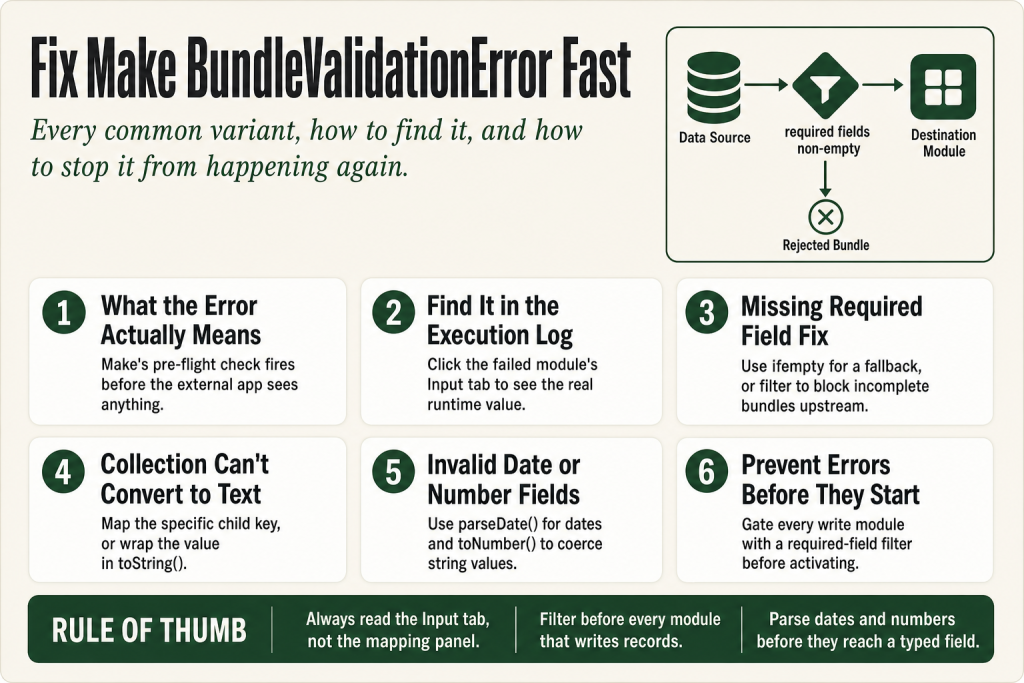
- What it is: Make BundleValidationError means a module’s input failed the platform’s type and presence check before being sent to the app.
- Most common causes: a required field is empty, a mapped value is a collection (object) when the field expects text, a number field received a string, or a date field received an unformatted text string.
- How to find it: open the execution log, click the failed module (shown with a warning indicator), then inspect its Input tab — the offending parameter is listed there with the value Make actually tried to send.
- Quick fixes: wrap the mapped value in
{{ifempty(value; “fallback”)}}for optional fields, use{{parseDate(value; “format”)}}for date fields, usetoString(value)to coerce a collection to text, or add a filter before the module to block bundles missing the required value. - Prevention: use a pre-module filter to assert required fields are not empty; never map a whole collection where a text field is expected; validate date formats at the source.
Take this fix into your next scenario. The free Builder’s Companion Kit collects the checklists and templates that pair with this guide — so next time, you start from a template, not a blank page. Grab it free →
- What Make BundleValidationError Actually Means
- How to Locate the Failing Parameter in the Execution Log
- Missing Value of Required Parameter
- Collection Can’t Be Converted to Text
- Invalid Number in Parameter
- Invalid Timestamp in Parameter — Date Fields
- Array and Iterator Validation Errors
- Worked Example: Google Sheets → Notion With a Make BundleValidationError
- Null, Empty String, and Undefined — They’re Not the Same
- Prevention Patterns — Stop BundleValidationErrors Before They Start
- FAQ
A Make BundleValidationError is Make’s way of saying that a module tried to send a value to an app — and that value was wrong in some way the app refuses to accept. Wrong type, missing entirely, empty when it can’t be, structured as a collection when the field wants plain text. The error fires at the module level, which means everything upstream ran fine. The problem lives right at the handoff point between what Make assembled and what the destination expects.
The frustrating part: the error message names the parameter, but it doesn’t always show you why the value is wrong or where it came from. This article walks you through every common variant, how to locate the bad value in the execution log, and how to fix — or prevent — each one.
What Make BundleValidationError Actually Means
Every Make module has a schema — a list of parameters with expected types, required/optional flags, and sometimes allowed value sets. When a bundle arrives at a module, Make runs a validation pass before sending anything to the external app. If any parameter fails that check, the whole bundle is rejected and you get a BundleValidationError.
The error message follows a consistent structure:
BundleValidationError
Validation failed for 1 parameter(s).
› Missing value of required parameter ‘title’
Or it might read:
BundleValidationError
Validation failed for 1 parameter(s).
› Collection can’t be converted to text for parameter ‘json’
The number in “Validation failed for N parameter(s)” tells you how many fields are broken in that one bundle. Each broken field is listed on its own line beneath it. Read those lines carefully — they are the whole diagnosis.
Other documented variants include:
- Invalid number in parameter — a text string landed in a numeric field
- Invalid timestamp in parameter — a date field received something it can’t parse as a date
- Prohibited value in parameter … in position N — an array element holds a value not in the allowed set
- Cannot read properties of undefined — Make tried to drill into a nested path that doesn’t exist on this particular bundle
None of these are API errors from the destination service. They are Make’s own pre-flight check. The destination app never even sees the bad bundle.
How to Locate the Failing Parameter in the Execution Log
You have two entry points depending on whether the scenario is still running or already finished.
From the scenario editor (live or manual run)
When a run fails, the broken module shows a warning indicator directly on the canvas. Click it. Make opens a detail panel showing the error text and — critically — an Input tab and an Output tab. The Input tab shows exactly what values Make assembled and tried to pass to that module. Find the parameter the error named. That is the value you need to fix.
From execution history
In the scenario editor, open the history panel (the clock/hourglass icon). Locate the failed execution — it shows an error status. Click into it, then click the module that carries the warning. The same Input/Output panel opens. This is where you can compare what Make sent against what the module’s schema required.
One thing that trips people up: the error might list parameter ‘data’ or ‘url’ even though you can clearly see a value mapped in the module’s configuration panel. The reason is that the value evaluated to empty or the wrong type at runtime, even though something was mapped at design time. Always read the actual runtime value in the Input tab, not what the mapping panel shows.
Missing Value of Required Parameter
This is the most common variant. The module has a field marked required, you mapped something to it, but at runtime the upstream data didn’t contain that value — so Make passed empty, and the validator rejected it.
Common scenarios:
- A Google Sheet row has an empty cell for a column you mapped to a required Notion field
- An AI module returned a list with 19 items but one item was missing the key you’re iterating on — so bundle 20 has no value for that parameter
- A webhook payload is inconsistent: most submissions include a field, but some forms leave it out
Fix 1: Block the bundle upstream with a filter
Add a filter between the data source and the failing module. Set it to: Parameter name → Exists (or Is not empty). Bundles that fail the filter simply don’t reach the module. This is the right fix when the record is genuinely incomplete and should not be processed. See Make Filter Not Working for the gotchas around filter logic.
Fix 2: Provide a fallback with ifempty
If the field is required but you can supply a safe default, wrap the mapped value:
{{ifempty(1.title; “Untitled”)}}The ifempty function returns its second argument when the first argument is not defined, null, or an empty string — and returns the first argument otherwise. That covers all three empty states at once. Use it when a placeholder value is acceptable downstream; don’t use it to silently swallow data you actually need.
Fix 3: Stop the module gracefully for optional paths
If the whole record should be skipped without an error, add an error handler route on the module and attach a Skip directive. Skip drops that bundle and lets the scenario continue with the next one. Be aware: anything downstream of that module on the same route will also not run for that bundle — confirm that’s acceptable before applying Skip. For more on error directives, see Make Error Handling.
Collection Can’t Be Converted to Text
This variant is the most confusing one because the mapping looks right. You dragged a pill from the previous module into a text field. But that pill is actually a collection — an object with nested keys — not a plain string. Make can’t automatically flatten an object into text, so it throws a BundleValidationError.
The classic trigger: you map an entire JSON object or a module output that returns a structured collection into a field that expects a single string, such as a JSON parameter or a Message body field.
Why it happens
Some modules output a field that looks like a string label in the mapping panel but is actually a nested collection at runtime. Array items from an iterator, for example, may carry sub-properties that only appear when you expand the pill. If you map the parent pill instead of the specific child key, you’re sending the whole collection.
Fix: map the specific child key
Open the module where you made the mapping. Click the pill you dropped into the field. You should see a path like 3.results. What you need is 3.results.name or whatever the specific text property is. Drill down to the scalar value, not the parent object.
Fix: convert to text explicitly
If you genuinely need to serialize a collection to a string — for example, you’re logging the raw object — use {{toString(3.results)}}. This coerces the collection to a JSON-formatted text string that a text field can accept. Be aware that toString on a collection produces JSON syntax, not human-readable prose.
Related: if you’re passing structured data between modules and hitting type errors, check Make Parse JSON Not Working — the same type-mismatch logic applies in reverse when consuming JSON.
Invalid Number in Parameter
A field expects a number. It got text. This happens most often when:
- Your data source stores IDs or quantities as strings (
“42”instead of42) - A Google Sheet cell that should be numeric has been formatted as text
- A formula in an earlier module produced a string concatenation result instead of a numeric one
- The value is empty — and Make evaluates empty as non-numeric
Fix: coerce to number
Use {{toNumber(1.quantity)}} to explicitly convert a string to a number. If the value might be empty, combine it: {{toNumber(ifempty(1.quantity; 0))}}. This gives you a guaranteed numeric zero rather than an empty string going into a number field.
Don’t use toNumber blindly — if the upstream value is genuinely absent and zero is a meaningful/dangerous default in your workflow, use a filter to gate on non-empty values instead.
Invalid Timestamp in Parameter — Date Fields
Date fields in Make expect a date object, not a text string. If you map a text value like “2024-07-15” directly into a date parameter, Make can’t use it and throws a validation error. This is especially common when reading dates from spreadsheets, form submissions, or webhook payloads where dates arrive as plain text.
Make internally uses ISO 8601 format (YYYY-MM-DDTHH:mm:ss.sssZ) for date-time values. Any other format needs to be parsed first.
Fix: parseDate
Convert the text string to a Make date object before passing it to the field:
{{parseDate(1.due_date; “YYYY-MM-DD”)}}The second argument is the format pattern that describes what the incoming text looks like — not the format you want out. If your source sends “July 15, 2024”, the pattern would be “MMMM D, YYYY”. Mismatching the pattern to the actual text is itself a common sub-cause of this error.
Dates without time
If your date has no time component, be careful: adding a time zone conversion can shift the date by a day. The safest practice for date-only values is to keep them as text through the flow and only convert when the destination requires a date type. Use formatDate if you need to output to a different text format at the destination end.
If your date string is sometimes missing entirely, guard it: {{parseDate(ifempty(1.due_date; “1970-01-01”); “YYYY-MM-DD”)}} — though a filter gating on non-empty is cleaner if a missing date means the record shouldn’t be processed at all.
Array and Iterator Validation Errors
Some fields expect an array — a list of values — not a single scalar. If you pass a single text string into an array field, or if an iterator produces bundles where one element is missing a nested required key, you get a BundleValidationError on that specific bundle.
The intermittent variant
This is the sneakiest form: your scenario runs fine on 19 out of 20 records, then fails on the 20th. The 20th record has a slightly different structure — an empty array, a missing nested key, or a null where the others had values. You won’t catch this in test mode if you only run against a well-formed sample.
Fix: guard array items with ifempty or filters
If you’re iterating over an array and passing items to a module, add a filter on the iterator’s output route that checks the required key exists before the next module sees the bundle. For example: filter where 1.items[].title exists. This prevents partially-formed array items from reaching the module.
“Prohibited value in parameter … in position N”
This means an array element holds a value outside the field’s allowed set — like passing “purple” to a status field that only accepts “active”, “inactive”, or “pending”. Check the destination app’s docs for the exact allowed values, then use an if expression to map to a valid default when the upstream value doesn’t match: {{if(1.status = “purple”; “inactive”; 1.status)}}.
Worked Example: Google Sheets → Notion With a Make BundleValidationError
Here’s a real pattern that generates a BundleValidationError and the exact steps to fix it.
Setup: Trigger is Google Sheets — Watch New Rows. The action is Notion — Create Database Item. The Notion database has a required Title property and a Due Date property.
The error:
BundleValidationError Validation failed for 2 parameter(s).
› Missing value of required parameter ‘title’
› Invalid timestamp in parameter ‘due_date’
Step 1 — open the Input tab on the failed Notion module. You see that title evaluated to empty and due_date evaluated to “” (an empty string, not a date object).
Step 2 — trace title back. The mapping shows {{2.A}} — column A of the sheet. Go to the execution log for the trigger module (module 2) and inspect the output for that specific bundle. Column A is empty in that row. The sheet row is incomplete.
Decision point: Should an incomplete row be skipped, or should it create a Notion item with a placeholder? Decide this before you code the fix — it’s a business logic call, not a technical one.
Fix for title (skip approach): Add a filter between the Sheets module and the Notion module: Column A → Text operator: Is not empty. Rows without a title never reach Notion.
Fix for due_date: The date column in the sheet sometimes has a value, sometimes doesn’t. Use:
{{parseDate(ifempty(2.C; “2099-12-31”); “MM/DD/YYYY”)}}This sets a far-future sentinel date when the column is blank, which is visible enough in Notion to flag for human review. If a blank date should mean no date at all, use the filter approach instead and only pass the date when the cell has a value — you may need a router to split the path. See Make Router Guide for how to structure that split.
Step 3 — re-run with the incomplete row. The filter blocks it. The Notion module never fires. No BundleValidationError. Check the execution log to confirm the filter correctly stopped the bundle — it should show a filtered-out count, not an error.
Null, Empty String, and Undefined — They’re Not the Same
Make treats three distinct empty states, and mixing them up causes subtle bugs:
- Undefined — the key doesn’t exist at all in the bundle. A field that was never in the upstream data.
ifemptycatches this. - null — the key exists but its value is explicitly null.
ifemptycatches this too. - Empty string (
“”) — the key exists and its value is a zero-length string.ifemptycatches this as well.
The ifempty function handles all three — it returns its second argument when the first is not defined, null, or an empty string. That’s the function to reach for when you want a single expression to guard against any absence of value.
What ifempty does not catch: a value of 0 (numeric zero), false (boolean), or “null” (the literal text string). If your upstream sends the string “null” when a field is absent, you need an explicit check: {{if(1.field = “null”; “”; 1.field)}}.
For update modules, Make also has an erase keyword that explicitly sends null to a field in the destination service — useful when you want to clear a value rather than leave it unchanged. This is different from simply leaving a field empty, which on platform version 2 apps causes Make to omit the field from the request entirely rather than nulling it out.
Prevention Patterns — Stop BundleValidationErrors Before They Start
Fixing errors reactively is fine. Not generating them in the first place is better — especially in production scenarios running on a schedule where a broken bundle creates an incomplete execution that sits in a queue.
1. Run a test with deliberately incomplete data
Before activating a scenario, manually feed it a bundle with key fields empty or null. If the scenario handles it without error, you’re good. If it throws a BundleValidationError, fix it now rather than at 2 AM when the production run fires. See Make Incomplete Executions for what happens when errors do reach production.
2. Put a required-field filter before every write module
Any module that creates or updates a record in an external app should have a filter upstream asserting that every required field is non-empty. Think of the filter as a gate — only well-formed bundles get through. This is one line of configuration that eliminates an entire class of errors.
3. Never map a collection pill to a text field without explicit conversion
If the mapping panel shows a pill with an arrow (indicating it’s expandable), don’t drop it into a text field at the top level. Expand it first, find the scalar child key, and map that instead.
4. Validate date formats at the source
If your data source sends dates in a format that varies — or that might be empty — standardize it in a formula module or Set Variable before it reaches the module that needs a typed date. Isolating the parseDate call in one place means there’s one spot to fix if the format changes.
5. Use Set Variable to snapshot values for debugging
When a BundleValidationError is intermittent — only some bundles fail — add a Set Variable module before the failing module and store the values of the suspect parameters. This creates a log entry for every bundle, not just the ones that fail. You can then compare the variable values for passing and failing bundles side by side. See Make Set Variable / Get Variable for how the module works.
6. Watch for upstream schema changes
A scenario that has been working for months can start throwing BundleValidationErrors after the upstream app changes its output structure — a key gets renamed, a field type changes, or a field starts returning null instead of a default. This is one of the most common reasons a stable scenario suddenly breaks. The fix is always the same: open the execution log, read the actual runtime value, and update the mapping.
FAQ
Why does Make BundleValidationError say a parameter is missing when I can see a value mapped in the module?
The mapping panel shows what you configured at design time. The validation error reflects the actual runtime value — which evaluated to empty or the wrong type for that specific bundle. Open the Input tab on the failed module in the execution log to see the real value Make tried to send.
Can I use ifempty to fix a missing required field?
Yes, but only when a fallback value is safe. Wrap the mapped value like this: {{ifempty(1.field; “fallback”)}}. The function returns the fallback when the first argument is undefined, null, or an empty string. If a missing value means the record shouldn’t be processed at all, a filter is a better fix than ifempty.
How do I fix “Collection can’t be converted to text” in Make?
You’re mapping a collection (object) to a text field. Either drill into the collection and map the specific scalar child key you need, or wrap the mapped value in {{toString(value)}} to serialize the whole object as a JSON-formatted string. The toString approach is for logging or raw passthrough — it produces JSON syntax, not human-readable text.
Why does my scenario fail on some records but not others?
The data is inconsistent across bundles. One record has a key your mapping assumes; another doesn’t. Run a test using a record that reflects the worst-case data structure — empty cells, missing keys, null values. Add a filter or ifempty guard to handle those cases before the failing module sees them.
What is the difference between BundleValidationError and an API error in Make?
BundleValidationError is Make’s own pre-flight type check — it fires before any request is sent to the external app. An API error comes back from the destination app after Make successfully sent the request. If you see BundleValidationError, the external app was never contacted.
How do I handle a date that is sometimes empty without getting a validation error?
Combine ifempty and parseDate: {{parseDate(ifempty(1.date; “2099-12-31”); “YYYY-MM-DD”)}}. Use a sentinel date (far future or far past) that’s clearly a placeholder for human review. Alternatively, add a filter that lets the bundle through only when the date field is non-empty, and handle the no-date path on a separate router branch.
Sources:
Sources: Make Community — Common error types reference; Make Developer Hub — IML functions including ifempty; Make Developer Hub — Processing of empty values; Make Help Center — Date and time functions; Make Developer Hub — Date parameter type and ISO 8601 format.
Brian Kasday spent forty years in direct-response marketing before rebuilding the whole operation as a one-person shop. He writes The Operator’s Library — including “The Missing Manual for Make” — for operators who’d rather build it themselves than wait on someone else.
Get the Builder’s Companion Kit — the free checklists and templates that pair with this guide: mmsvegas.com/make-resources.
This guide solves one Make problem. The Missing Manual for Make covers the production system. See the manual →
More Make guides
Free · Make Operator Toolkit
Running scenarios in Make?
Get the free operator toolkit — production checklists and the fixes that keep scenarios alive under real traffic, plus a note when this guide changes.
Get the free toolkit →