
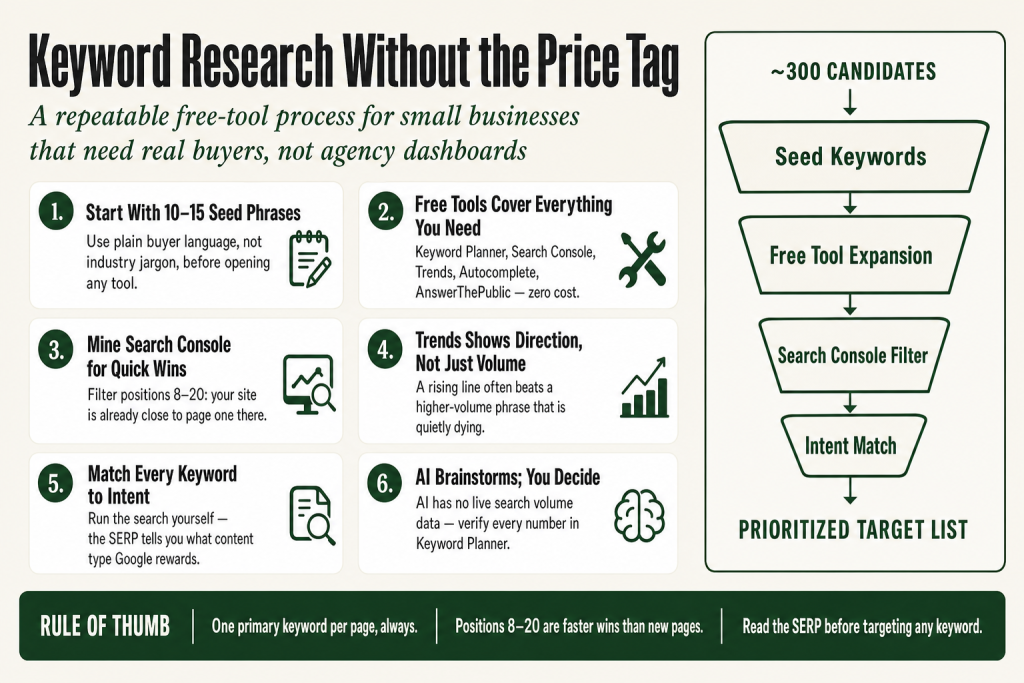
The 30-second answer
- Start with seed keywords: List 10-15 phrases you think buyers use. Keep them specific to your service and location.
- Expand with free tools: Run seeds through Google Autocomplete, Google Keyword Planner, and AnswerThePublic (3 free searches per day) to build a longer list.
- Check what you already rank for: Google Search Console shows the exact queries bringing people to your site right now, and highlights pages sitting in positions 8-20 that are close to page one.
- Validate with Google Trends: Confirm a keyword is growing (or at least stable) before you commit time to writing about it. Note that Google Trends shows relative popularity on a 0-to-100 scale, not raw search volume numbers.
- Filter by intent and winnability: Match each keyword to the right content type, then read the actual SERP to gauge how hard it will be to rank.
- The judgment call stays with you: AI and free tools can surface options. You decide which keywords fit your business, your authority, and your content capacity.
Take this fix into your next scenario. The free Builder’s Companion Kit collects the checklists and templates that pair with this guide — so next time, you start from a template, not a blank page. Grab it free →
- Why Free Tools Are Enough for Most Small Businesses
- Step One: Build Your Seed Keyword List
- Step Two: Expand Your List With Free Tools
- Step Three: Mine Google Search Console for Quick Wins
- Step Four: Validate With Google Trends
- Search Intent: The Filter That Actually Matters
- Worked Example: A Local HVAC Company Runs the Full Process
- Where AI Fits Into Keyword Research (and Where It Does Not)
- Building a Simple Keyword Map You Will Actually Use
- FAQ
Keyword research small business owners actually need is not locked behind a $200-per-month subscription. The expensive tools are impressive. They are also built for agencies managing fifty clients at once. You are managing one: yours. What you need is a repeatable process that tells you which phrases real buyers type into Google, which of those phrases you can realistically rank for, and which ones to write content around first. You can do all of that with free tools you already have access to, a spreadsheet, and one focused morning. This article walks you through the whole process step by step.
Why Free Tools Are Enough for Most Small Businesses
Paid SEO platforms are built for volume. They earn their price when you are managing competitor gap analysis across hundreds of pages, running rank-tracking reports daily, or prospecting backlinks at scale. If your site has under a hundred pages and you are not an agency, the free toolset covers everything you need.
The free toolkit:
- Google Keyword Planner (inside Google Ads, no spend required): pulls search volume data straight from Google.
- Google Search Console: shows the exact queries your site already receives, with clicks, impressions, average position, and click-through rate.
- Google Trends: shows whether interest in a topic is rising, steady, or fading, and lets you compare up to five terms side by side. It shows relative popularity, not raw search counts.
- Google Autocomplete and People Also Ask: free, real-time query data every time you open a search bar.
- AnswerThePublic: structures autocomplete data into question clusters organized by who, what, where, why, and how. Free accounts get three searches per day.
That combination covers keyword discovery, volume estimation, current performance, and content ideation without spending a dollar. Paid tools earn their price when you need competitor backlink data or daily rank tracking at scale. For a solo operator focused on a single niche, you are not there yet.
One honest caveat: without active ad spend in Google Ads, Keyword Planner shows search volume as broad ranges (for example, 1K to 10K per month) rather than exact numbers. That is fine for sorting keywords into large, medium, and small buckets, which is all you need at this stage.
Step One: Build Your Seed Keyword List
A seed keyword is the short, obvious phrase at the center of your topic. Everything else branches out from it. Start by listing 10 to 15 phrases you believe buyers use when they are looking for what you sell. Think in plain language, not industry jargon.
A wedding photographer in Phoenix does not seed with ‘professional portraiture services.’ She seeds with ‘wedding photographer Phoenix,’ ‘engagement photo session,’ and ‘how much does a wedding photographer cost.’ Those are the phrases a real buyer types on a Tuesday night.
Quick seed-building prompts:
- What does a first-time buyer call your service? Not your industry term. Theirs.
- What did customers type into Google before they found you? Check your intake forms or new-client questionnaires.
- What objection do you answer most often on sales calls? That objection is usually a keyword.
- What does your closest local competitor use in their page titles and meta descriptions? (View source or inspect element on their homepage.)
Write these seeds into a plain spreadsheet before you open any tool. The tool is for expanding and validating your seeds, not for generating them from scratch. You know your buyers better than any algorithm does.
Step Two: Expand Your List With Free Tools
Now you take each seed and let the free tools multiply it. Think of this step as turning a seed packet into a full tray of seedlings. You will trim it back later. First, grow it.
Google Autocomplete
Type your seed into Google but do not press Enter. The dropdown suggestions are Google publishing its query logs one phrase at a time. They represent real searches with real volume. Try adding a space before and after your seed, and add modifiers like ‘near me,’ ‘cost,’ ‘vs,’ or ‘how to’ to surface more variations.
People Also Ask
Run your seed as a full search and scroll to the ‘People Also Ask’ box on the results page. Click any question to expand it and watch the box populate new questions. This is a free, self-refilling question-research tool built into every Google search.
AnswerThePublic
Paste your seed into AnswerThePublic (answerthepublic.com). The free plan gives you three searches per day. Each search loads a visual report organized by question type (who, what, where, why), prepositions, and comparisons. Free accounts can export results as CSV files, though each export is capped at 30 keywords per file. Paste the results into your spreadsheet. Use your three daily searches on your three most important seeds, then come back the next day for the rest.
Google Keyword Planner
Access Keyword Planner through Google Ads at ads.google.com. You need a Google Ads account, but you do not need to run any ads. During the signup flow, look for the option to switch to Expert Mode, then look for a way to skip or exit campaign creation without launching an ad. The exact label varies depending on when you sign up, but the destination is the same: your Google Ads dashboard without an active campaign. Once inside, go to Tools, then Planning, then Keyword Planner. Paste your seeds into ‘Discover new keywords’ and pull back hundreds of related terms with volume ranges and competition levels.
Important: the ‘Competition’ column in Keyword Planner reflects how many advertisers are bidding on that keyword for paid ads. It does not tell you how hard that keyword is to rank for organically. Keep that column for context, not for filtering your SEO list.
By the end of this step, you should have 100 to 300 candidate keywords in your spreadsheet. That is too many to target. The next steps cut it down to a workable list.
Step Three: Mine Google Search Console for Quick Wins
If your site has been live for more than a few months, Google Search Console (search.google.com/search-console) is the most underused tool in your stack. It shows you the exact queries people used to find your site, along with clicks, impressions, average position, and click-through rate. This is not estimated data. It is what Google actually recorded.
The quick-win filter: In the Performance report, click the Queries tab and then filter by average position between 8 and 20. These are keywords where your site already appears in Google’s results but sits on the second half of page one or somewhere on page two. You are close. Optimizing an existing page for these terms is often faster than writing a new page for a brand-new keyword.
Also worth checking: look for queries that generate a lot of impressions but very few clicks. High impressions, low clicks usually means your title tag or meta description is not compelling enough, or a rich result (like an AI Overview or a featured snippet) is absorbing the traffic before anyone reaches you. That is a copy problem, not a keyword problem.
Search Console also has a branded queries filter inside the Performance report. First announced by Google on November 20, 2025, and confirmed as available to all eligible sites on March 11, 2026, this filter lets you separate your brand-name traffic from non-branded discovery traffic with a single toggle, without building manual regex filters. For keyword research purposes, the non-branded queries are the ones that matter most: those are the people who found you without already knowing your name. Note that the filter is available for eligible top-level domain properties only, not subdomains or URL-path properties, and low-traffic sites may not yet meet the volume threshold Google requires. Historical data depth varies by property: some sites will have segmented data going back to the feature’s activation date, others may have less.
Pair your Search Console data with your candidate list from Step Two. Any keyword where you already have impressions is a keyword Google has already associated with your site. Those are your highest-priority targets.
For more on reading your marketing data without a specialist, see How to Read Your Marketing Data Without an Analyst.
Step Four: Validate With Google Trends
Search volume is a snapshot. Google Trends shows motion. A keyword with modest volume but a steady upward line often beats a higher-volume phrase that is quietly dying. Direction matters more than the number on the day you check it.
Google Trends (trends.google.com) is free and does not require an account. Type in a keyword, set your country and a time range (12 months is a good default for most service businesses), and read the line. A flat line is fine. A rising line is better. A declining line is a warning sign worth heeding before you invest weeks writing content around a phrase that is losing relevance.
The useful move for keyword research is the compare feature. Add a second term and Google Trends puts both lines on the same chart using a 0-to-100 relative scale, where 100 represents the peak search interest for that term within the range you selected. This is a relative index, not a raw search count. A score of 80 does not mean 80 searches. It means that point in time had 80% of the peak interest for that term in your selected range. Use the compare feature to decide between two similar phrases: for example, ‘HVAC tune up’ versus ‘AC maintenance.’ The term with the stronger trend trajectory is the better long-term bet, even if their volumes look similar in Keyword Planner today.
Scroll down in Trends to ‘Related queries.’ The Rising tab shows terms that have gained significant search interest recently. These can surface adjacent topics your competitors have not written about yet.
One honest limit: Google Trends shows only relative popularity, not raw search numbers. Do not mistake a trending line for high absolute volume. A keyword can trend at 100 out of 100 and still have very few monthly searches if the topic is niche. Always cross-reference with your Keyword Planner volume ranges to get a sense of actual scale.
Search Intent: The Filter That Actually Matters
You now have a trimmed list of keywords with volume ranges, trend data, and your own Search Console performance data attached. Before you start assigning keywords to pages, you need to answer one question for each: what does a person who types this actually want?
Search intent breaks into four types. Each type matches a different kind of content:
- Informational: The person wants to learn something. Modifiers like ‘how to,’ ‘what is,’ ‘why does,’ and ‘who should’ signal this intent. Match with educational blog posts, guides, and how-to articles.
- Commercial: The person is comparing options before deciding. Modifiers like ‘best,’ ‘vs,’ ‘review,’ ‘top,’ and ‘alternatives’ signal this intent. Match with comparison posts, roundups, and case studies.
- Transactional: The person is ready to act. Modifiers like ‘buy,’ ‘price,’ ‘near me,’ ‘hire,’ ‘cost,’ and ‘get a quote’ signal this intent. Match with service pages, pricing pages, and landing pages.
- Navigational: The person is trying to reach a specific site or brand. These searches rarely represent an opportunity for you unless the brand is yours.
The fastest first step to confirm intent is to run the search yourself and read the results. Look at what Google surfaces: if the top ten results are all ‘how-to’ guides, Google is treating that keyword as informational. Writing a landing page for it will not rank, no matter how well-optimized it is. Match what you see on the SERP.
That said, the SERP is a starting point, not the whole picture. Also look at what content format each ranking page uses: is it long-form editorial, a listicle, a product page, or a local map pack? Read the headlines and subheadings. Notice the reading level and depth. Those details tell you what kind of content a real buyer actually finds useful for that query, which is what Google is ultimately trying to reward. The SERP reflects a pattern across thousands of searches. Your job is to understand the pattern, then produce something genuinely more useful than what is already there.
This is also where you get a realistic read on competitiveness. Look at the pages ranking in positions one through five. If they are all from major national brands or high-authority publications, that keyword is not your first battle. Find a more specific variant where the ranking pages are smaller sites, local businesses, or recent content with thin depth. That is your opening.
For a full playbook on building content around these keywords, see Small Business SEO Checklist You Can Run Yourself.
Worked Example: A Local HVAC Company Runs the Full Process
Here is what the full process looks like for a real business type. The same logic applies regardless of your industry.
The business: A one-truck HVAC company in Tucson, Arizona. Owner-operator, no marketing team.
Step 1: Seeds. The owner lists ten seeds based on what customers say on calls: ‘AC repair Tucson,’ ‘air conditioning not working,’ ‘HVAC tune up near me,’ ‘how much does AC repair cost,’ ’emergency AC repair,’ ‘new AC unit cost,’ ‘AC maintenance plan,’ ‘furnace repair Tucson,’ ‘thermostat not working,’ ‘when to replace AC unit.’
Step 2: Expansion. Running ‘AC repair Tucson’ through Keyword Planner returns variants including ‘AC repair Tucson AZ,’ ‘same day AC repair Tucson,’ ‘cheap AC repair Tucson,’ ‘air conditioning repair Tucson cost.’ AnswerThePublic on ‘AC repair’ surfaces questions like ‘how long does AC repair take,’ ‘can AC repair be done in the rain,’ and ‘AC repair or replace.’ All of these go into the spreadsheet.
Step 3: Search Console. The owner checks the Performance report filtered to positions 8-20. He finds his site already gets impressions for ‘HVAC maintenance Tucson’ (position 14) and ‘AC tune up cost Tucson’ (position 11). Both go to the top of his priority list because the site already has partial authority for these terms.
Step 4: Trends. He compares ‘AC tune up’ and ‘AC maintenance’ in Google Trends. Both lines are on a 0-to-100 relative scale, so he is reading trajectory, not absolute volume. ‘AC maintenance’ has a steadier year-round line. ‘AC tune up’ spikes harder in spring. He decides to write a page targeting ‘AC maintenance Tucson’ as the primary phrase for evergreen traffic, then plan a spring campaign update around ‘AC tune up.’ He cross-checks both terms in Keyword Planner to confirm neither is a low-volume niche before committing.
Intent filter. ‘How much does AC repair cost’ is informational/commercial. He writes a transparent pricing page that answers the question directly and links to his service booking form. ‘Emergency AC repair Tucson’ is transactional. He makes sure that phrase appears in his homepage title tag and in a dedicated service page with a click-to-call button above the fold.
Total time: one Saturday morning. No paid tools. The list he ends up with is twelve pages worth of specific, ranked targets, ordered by a combination of position data, trend trajectory, and intent match.
If you want to turn that keyword list into a full content plan, Marketing Calendar for Small Business shows how to slot content into a repeatable publishing cadence you can actually maintain alone.
Where AI Fits Into Keyword Research (and Where It Does Not)
AI tools can speed up the brainstorming phase of keyword research. Ask a well-prompted AI assistant to generate 30 seed variations for your service, list the questions a skeptical buyer might ask before hiring you, or suggest content angles for a given keyword cluster. That is genuinely useful, and it cuts the time you spend staring at a blank spreadsheet.
What AI cannot do: tell you how many people actually search a phrase. AI models have no access to live search volume data. If you ask one to give you search volumes, it will either refuse or invent numbers. Verify every volume estimate in Google Keyword Planner or Search Console, not in a chat window.
AI also cannot read the current SERP to tell you who is ranking and how strong they are. That requires opening a browser and looking. The judgment calls in keyword research stay entirely with you: which phrases to target, in what order, with what content type. Those decisions require knowing your business, your capacity, and your competitive position. An AI does not know any of that. It can hand you a longer list of options faster than you could build one alone. Treating that list as a finished strategy without your own review is how you end up optimizing for phrases that have nothing to do with how your actual buyers think.
That distinction matters more than it sounds. AI cuts your dependence on outside consultants for the research grunt work. It does not hand over the thinking. The brainstorming is the easy part. The strategic layer, deciding what to pursue, in what sequence, and why, stays squarely with you. That is not a limitation to work around. It is the point. You know your business, your margins, your customers, and your capacity in a way no tool ever will. Use AI to get to a longer starting list faster, then apply your own judgment to every decision that follows.
For a deeper look at how to build that kind of AI-assisted workflow without outsourcing your strategic judgment, see How to Write Marketing Copy With AI (the Solo Operator’s Method) and How to Do Market Research With AI in an Afternoon.
Building a Simple Keyword Map You Will Actually Use
A keyword map assigns one primary keyword (and two to four supporting keywords) to each page on your site. It prevents two pages from competing against each other for the same phrase, and it tells you exactly which page to update when you want to strengthen a specific keyword position.
Your map does not need to be elaborate. A spreadsheet with four columns does the job:
- URL: the page the keyword points to.
- Primary keyword: one phrase per page.
- Supporting keywords: two to four related phrases the page also covers naturally.
- Intent: informational, commercial, or transactional.
Start by mapping your existing pages before you write anything new. You will often find pages that have no assigned keyword at all, and pages that are accidentally competing with each other. Fix those first. They are faster wins than new content.
Once your existing pages are mapped, use your prioritized keyword list (from Steps 1 through 4 above) to identify gaps: searches where there is clear demand but no page on your site addresses the topic. Those gaps become your content calendar.
For a landing-page-specific version of this thinking, the Landing Page Brief Template walks through how to lock in strategy (including keyword assignment) before a designer or copywriter touches the page.
FAQ
do I need to pay for keyword research tools as a small business
No. Google Keyword Planner, Google Search Console, Google Trends, and AnswerThePublic’s free tier cover keyword discovery, volume estimation, current performance data, and question research at no cost. Paid tools earn their price when you need competitor backlink analysis or daily rank tracking at scale, which most small businesses do not need yet.
how many keywords should a small business try to rank for
Focus on one primary keyword per page and two to four supporting keywords. Most small business sites have between ten and fifty pages that can realistically be optimized. A tightly focused list of fifty to one hundred target keywords across your whole site is more actionable than a list of a thousand you never act on.
how do I know if a keyword is too competitive for a small business website
Run the search and look at the pages in positions one through five. If they are all major national brands or high-authority publications with hundreds of links, that keyword is not your first battle. Look for a more specific variant where the ranking pages are smaller sites, local businesses, or articles with thin depth. Those are your realistic entry points.
what is the difference between keyword difficulty and search volume
Search volume estimates how many times a phrase is searched per month. Keyword difficulty estimates how hard it will be to rank on the first page for that phrase. A keyword can have high volume and high difficulty (not worth pursuing early) or low volume and low difficulty (a realistic quick win). Most free tools show volume but not organic difficulty. Read the SERP directly to judge difficulty yourself.
can I use ChatGPT or another AI tool to do keyword research
AI is useful for brainstorming seed keywords and generating question variations, but it has no access to live search volume data. Any numbers an AI gives you for search volume are unreliable. Use AI to generate a list of keyword candidates, then verify volume and competition in Google Keyword Planner or Search Console. Every decision about which keywords to actually pursue, and in what order, stays with you. AI hands you a faster starting list. What you do with it is entirely your call.
how often should I redo keyword research for my small business
A full keyword research pass once or twice per year is usually enough for a small, stable service business. Run a lighter review whenever you add a new service, enter a new market, or notice a significant drop in organic traffic. Google Search Console makes quarterly check-ins quick: filter by positions 8-20 and look for pages that have moved up or dropped since your last review.
Sources:
Sources consulted for platform-specific claims in this article:
- Google Ads Help: Keyword Planner overview and access instructions (business.google.com/us/ad-tools/keyword-planner/)
- Google Search Console Help: Performance report (Search results) overview (support.google.com/webmasters/answer/7576553)
- Google Search Central Blog: Branded queries filter introduced November 20, 2025; confirmed available to all eligible sites March 11, 2026 (developers.google.com/search/blog/2025/11/search-console-branded-filter)
- Search Engine Land: Confirmed March 11, 2026 expansion of branded queries filter to all eligible sites (searchengineland.com/google-search-console-branded-queries-filter-expands-471387)
- AnswerThePublic official help documentation: Free plan confirmed at 3 searches per day; CSV exports available on free accounts and capped at 30 keywords per export (answerthepublic.zendesk.com)
- Google Trends (trends.google.com): verified free, no account required; confirmed relative 0-to-100 index, not raw search volume
Brian Kasday spent forty years in direct-response marketing before rebuilding the whole operation as a one-person shop. He writes The Operator’s Library — including “Build a Complete Marketing Department” — for operators who’d rather build it themselves than wait on someone else.
Get the Builder’s Companion Kit — the free checklists and templates that pair with this guide: mmsvegas.com/resources.
This guide handles one marketing job. Build a Complete Marketing Department builds the whole department. See the manual →
More Marketing guides
Free · Marketing Operator Toolkit
Running marketing on your own?
Get the free toolkit — the templates and the expensive mistakes behind a one-person marketing department, plus a note when this guide changes.
Get the free toolkit →